



Description
Download Photo Story 3 for Windows – photo slideshow, digital photos, create stories, Windows software, easy editing, special effects, personalized soundtracks, share stories
Overview
Photo Story 3 for Windows is a dedicated productivity tool designed to transform digital photos into dynamic, emotionally engaging slideshows. Targeted at individuals seeking a straightforward way to preserve and share life’s memorable moments, the software simplifies the process of storytelling through images. It enables users to compile personal photo collections and enhance them with visual and auditory elements, turning static images into narrative experiences. The app is particularly suited for families, educators, and hobbyists who value creative expression but may lack advanced video editing skills.
Developed by Microsoft, the application reflects the company’s long-standing commitment to accessible, user-centric software. Although it was released in 2015, its enduring relevance stems from its simplicity and effectiveness in a niche yet essential space—personal digital storytelling. The app addresses the common challenge of organizing photos into meaningful sequences without requiring technical expertise or extensive training. Real-world use cases include creating memory books for birthdays, documenting travel experiences, or sharing school project presentations with visual and audio enhancements.
Within the broader Windows software ecosystem, Photo Story 3 remains a notable example of lightweight, purpose-built tools that prioritize usability over complexity. Its compact size and minimal system requirements make it suitable for older or lower-spec devices, contributing to its longevity. While modern alternatives have emerged, the app continues to serve users who value a no-frills, reliable method for creating photo stories.
Key Features & Functionality
- Easy Photo Editing – Users can crop, rotate, and touch up photos with a single click, ensuring images are properly framed and visually appealing before inclusion in a slideshow.
- Stunning Special Effects – The software offers a range of built-in visual effects such as zooming and panning, which animate still images and add cinematic movement to the presentation.
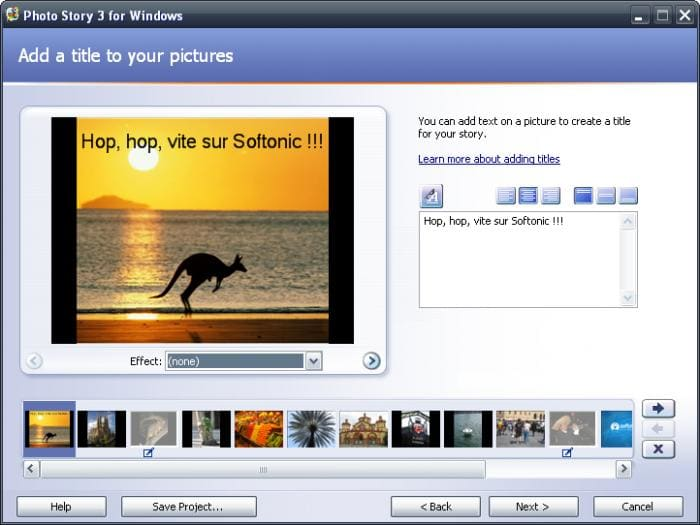
- Personalized Soundtracks and Captions – Users can insert custom music tracks and add text overlays to describe scenes, enhancing emotional context and narrative depth.
- Easy Sharing Options – With a compact file size, the resulting slideshow can be easily shared via email or transferred to Windows Mobile devices for on-the-go viewing.
- User-Friendly Interface – The interface is designed for intuitive navigation, allowing users of all experience levels to create professional-looking stories without prior training.
For example, a user preparing a birthday tribute can import photos, apply gentle zoom effects to highlight details, add a favorite song, and insert captions like “Happy 30th Birthday, Sarah!” The result is a polished, emotionally resonant presentation that can be shared instantly. Another use case involves a teacher creating a visual recap of a field trip, where students’ photos are enhanced with background music and descriptive titles to reinforce learning.
Interface, UX & Performance
Photo Story 3 for Windows features a clean, minimal interface centered around a linear workflow. The layout guides users through importing photos, editing them, adding effects and audio, and exporting the final slideshow. Navigation is straightforward, with clearly labeled buttons and a step-by-step progression that reduces user confusion.
The visual style is functional rather than flashy, focusing on clarity and ease of use. The interface does not overwhelm users with options, which supports its goal of accessibility. While the developer did not list formal performance metrics, the application’s small file size of 17.3 MB suggests efficient resource usage. It is likely to run smoothly on older Windows systems, though performance may vary depending on hardware.
Responsiveness is generally consistent during standard operations such as image import, effect application, and export. Stability appears reliable based on its long-standing availability, though no recent updates have been released since 2015. Users should expect a stable experience, but compatibility with newer Windows versions may be limited.
Platform Compatibility & Technical Requirements
Photo Story 3 for Windows is designed exclusively for the Windows operating system. The current version is 3.1.8721.0, released on March 18, 2015. The application has a file size of 17.3 MB, making it a lightweight download ideal for users with limited storage or slower internet connections.
Although the developer did not specify minimum OS requirements, the app was originally built for Windows XP and later versions, including Windows 7 and 8. Compatibility with Windows 10 or 11 is not guaranteed and may depend on system configuration and emulation tools. Users are advised to test the software on their device before full reliance.
There is no indication of cloud integration, mobile sync, or cross-platform availability. The software operates entirely offline, which may be a benefit for privacy-focused users. However, the lack of modern updates raises concerns about long-term functionality on evolving Windows environments.
Pros and Cons
Pros
- Simple, intuitive interface suitable for beginners and non-technical users.
- Lightweight file size (17.3 MB) enables fast installation and low storage usage.
- Free to download and use, with no hidden costs or in-app purchases.
- Offers essential editing, effects, and audio features for creating meaningful photo stories.
- Compact output files simplify sharing via email or portable devices.
Cons
- No official support or updates since 2015, raising compatibility concerns with modern Windows systems.
- Not available on mobile platforms or other operating systems.
- Limited customization options compared to modern video editing tools.
- Does not support newer file formats or high-resolution image inputs beyond basic compatibility.
- May require compatibility mode or third-party tools to run on newer Windows versions.
FAQ
Is Photo Story 3 for Windows safe to download?
Yes, the software is officially developed by Microsoft and distributed through trusted channels. However, users should ensure they download from verified sources to avoid modified or bundled versions.
Can I use Photo Story 3 on Windows 10 or Windows 11?
While the app was not officially updated for newer Windows versions, some users have reported success using compatibility mode. Performance may vary, and full functionality is not guaranteed.
Is Photo Story 3 free to use?
Yes, the software is available at no cost. There are no subscription fees, in-app purchases, or premium features.
What file formats does Photo Story 3 support?
The app supports standard image formats such as JPEG, PNG, and BMP. Audio files can be added in common formats like MP3 and WAV, though specific compatibility may depend on system configuration.
Can I edit my slideshow after creation?
Yes, users can return to their project at any time to make adjustments to images, effects, music, or captions. Projects are saved in the app’s native format for future editing.
Final Thoughts
Photo Story 3 for Windows remains a reliable, no-cost solution for users who want to create heartfelt, professional-looking photo slideshows without technical complexity. Its strengths lie in its simplicity, ease of use, and minimal system demands. While it lacks modern features and updates, its core functionality continues to serve individuals seeking a straightforward way to preserve memories.
It is particularly valuable for older systems, educators, and families who prioritize storytelling over advanced editing. The ability to personalize stories with music and captions adds emotional depth, making it more than just a slideshow tool—it’s a digital memory keeper.
Despite its age, the app still delivers real value in its niche. For those looking to create meaningful photo stories with minimal effort, Photo Story 3 offers a proven, accessible path.
Download Photo Story 3 for Windows now
Guides & Tutorials for Photo Story 3 for Windows
How to install Photo Story 3 for Windows
- Click the Preview / Download button above.
- Once redirected, accept the terms and click Install.
- Wait for the Photo Story 3 for Windows download to finish on your device.
How to use Photo Story 3 for Windows
This software is primarily used for its core features described above. Open the app after installation to explore its capabilities.
User Reviews for Photo Story 3 for Windows 0
No reviews found


